The absolute beginners guide to databasemaxxing
So, you are interested in getting started learning databases?
I get a lot of emails from people asking me how they can begin to learn the vast world of databases, and whether they are far enough along on their programming journey to bother trying to start to learn this sub-genre of CS. This post is meant to be my authoritative answer to those questions... Sort of a database specific version of: this post about programming in general.
First, lets answer the question of: Is it the right time to start learning database internals?... or am I far enough along to begin?
I would say that if you want to start learning DBMS internals, you should have completed at least a couple non-trivial projects, and you should be familiar with low level OS concepts, interacting with libc/POSIX API's. I highly recommend finishing an interpreter or compiler project before moving on to databases, because a compiler and a database are much more similar than you might imagine at first... Both are taking some code, parsing it into an AST and transforming it into some output (in fact SQLite uses a bytecode VM internally, very similar to what you would see in an interpreter).
You should also be deeply familiar with using databases and writing SQL/understanding JOIN's and schemas and the relational model first... Don't try to skip this step, as it will make everything that much more difficult later on. Some of this information may already be obvious to you, if you are an advanced user of databases, but will be explained anyway for brevity.
The rest of this post will assume you are roughly this far along, so I will not be defining things like AST because I will assume you are familiar with this at this point.
What if I am already familiar with DBMS internals?
Then this post is not for you: it is over-simplified in a way that attempts to make everything as easy to understand as possible for absolute beginners.
Common terminology
Let's go over some terms that you might not have heard if you have only ever been on the user end of database systems: Not just their definition, but we'll talk about in plain english what people mean when they use these terms. You will hear pretty much all these terms used frequently in the database world.
Remember these are somewhat simplified explanations, for their complete definitions, please refer to CMU Database Group's courses and read the Database Internals book by Alex Petrov.
-
Databasemaxxing: This is the brain-rot way of saying: "living a Database-centric lifestyle". To dedicate one's entire life to the study and practice of engineering database systems, choosing to live by the relational model. -
OLTPorOLTP system: Simply means a transactional database system like Postgres, MySQL or SQLite. These systems are generally focused on short, transactional workloads with frequent writes and reads as quickly as possible while providing all the ACID guarantees we expect from database systems. These systems store values on disk in groups of Rows, much like you would imagine they would if you have ever used one. -
OLAPorOLAP system: Conversely, this is an analytical database system like DuckDB, Snowflake or Clickhouse. These systems are focused on performing highly complex queries (think huge multi JOIN graphs with lots of aggregations), and write performance is generally far less of a concern than with OLTP systems: the performance focus is instead shifted to the query planner/optimizer, to better handle extremely large, complex joins over many large tables where the data cannot fit in memory (or might not even be on the same computer/node/data-center). These database systems typically (but not always) store the underlying values by groups of Column instead of by Row... This is (partially) because it makes it easier to compress the data on disk, which is not something typically done by OLTP database systems. -
DDL: Data Definition Language / any SQL statements that define the schema, so:CREATE TABLE,CREATE INDEX,DROP TABLEetc. -
DML: Data Manipulation Language, so thinkINSERT/UPDATE/DELETEstatements... Anything manipulating existing data in your database system. -
DQL: Data Query Language: Obviously this would be yourSELECTqueries. -
Tuple: is just database-speak for arow.. I imagine it's called this because a Row is very similar to the tuple you might know from your favorite programming language: one or more grouped values of various types. -
ScanorFull scan: The process of, or the reading of every single row in a table: So think, "the query does a full scan of 't'", means that if 't' has N rows, the query had to read all N rows in order to return the result (and that result could be anywhere from 0..=N rows). -
Row ID: An internal identifier for a row/tuple. Many storage engines use an integer row identifier (or something equivalent) which indexes store so the database can locate the row quickly. Some systems will use a declared INTEGER PRIMARY KEY as this ID: this is what's referred to as a "row id alias", because it is both a user facing column value, and also an internal identifier. -
ETL: This stands for: Extract, Transform, Load and typically this means a job which pulls data (usually out of an OLTP system), it might do things like create new indexes that weren't needed in the OLTP system but will be necessary or helpful to run analytical queries, and/or otherwise makes the raw data more 'structured'... Then loads it into an OLAP system to have analytical queries ran against it. -
Access method: The way in which we are going to retrieve values from a given table... For example: if we haveWHERE indexed_column = 123, then our access method would be an index seek onindexed_column... but if our query isSELECT * from t;: our access method would be a table scan, because our query requires us to fetch all the rows. -
SeekorIndex seek: A fast lookup using an Index, which allows the database system to traverse quickly to the value or tuple in question. (You can think of this as essentially the opposite of a Scan... at least generally: Scan = bad/slow, Seek = good/fast) -
Binding: The process of making AST nodes aware of your schema: So lets say we haveSELECT a, b FROM t;... This initially parses into something like:
Stmt::Select{cols:[Expr::Ident("a"), Expr::Ident("b")]} // ...After the binding process, we would end up with something like:
   Stmt::Select{
   cols: Expr::Column(ColumnRef{table: TableRef{name:"t",id: 0}, name: "a", id: 0},
         Expr::Column(ColumnRef{table: TableRef{name:"t",id: 0}, name: "b", id: 1} ) ))
and we have additional schema information encoded in the AST now, we know that "t" is a real table and it has columns "a" and "b" with internal ID's of 0 and 1 (internal ID's may just be the index of the col in the table)... It's now more than just an Identifier and it's aware of our actual schema. More info on this later.
WAL: Write-Ahead-Log: for several reasons, database systems usually do not write data directly to the main database file(s) during a transaction... Instead, writes are done to a separate, append-only file that contains the new/changed data and metadata about the operation (or in the case of SQLite: the new version of each of the 4kb pages touched). WAL's exist for several reasons:
- Doing all your writes as append-only keeps data written sequentially, which is much faster than doing scattered writes across 1 or more files on each write transaction.
- You now have a log of all transactions/changes, which can be replayed in the event of a crash.. If you write directly to the DB file(s), you will have no idea on startup after your crashed, whether or not your active writes ever finished or were somehow corrupted. Since the WAL is only ever truncated after the contents are copied to the database file(s), we know that it's contents have 100% safely been transferred over.
-
Snapshot isolation: When transactiont1begins their transaction at timet, either implicitly or explicitly, they should only ever see the state of the database as it exists at timet: Meaning if they are scanning a table which gets inserted into by some transactiont2during the scan, it will not seet2's rows. You can think of it like freezing the database right at the start of your transaction, each transaction should only ever see that frozen snapshot while that transaction is going on. (Not all databases use snapshot isolation by default, but many modern ones do. There are other levels of transaction isolation, such as "strictly serializable") -
Catalog: You can somewhat interchangeably use this withSchema, as it's generally referring to an internal representation of the database system's in-memory schema. E.g. the Binding phase resolves identifiers to columns/tables using the Schema or Catalog. -
Predicate: This is typically referring to theWHEREclause of a query, essentially meaning the constraints we are putting on our query which will filter the resulting output. InSELECT * FROM t WHERE a = 7:t.a = 7is our predicate. -
Push-DownorPredicate Push-Down: This is referring to applying a predicate (meaning essentially: filtering the resulting output) at a lower layer... Now this one is going to seem incredibly obvious, but let's imagine this query:
SELECT *
FROM users u
JOIN orders o ON u.id = o.user_id
WHERE u.last_name = 'Peters';
Now theoretically we could:
Read all rows from users
Join them with all rows from orders
Filter the result where last_name = 'Peters'
This obviously works but is very dumb, because we are joining a ton of rows that we are just immediately throwing away.
A better plan is:
Use the predicate last_name = 'Peters' while reading users
Only keep matching rows
Join those rows with orders
This is called predicate pushdown, because we pushed the filter down closer to the data source.
-
Checkpointing: The process of updating the actual database files with data from transactions which were written to the Write-Ahead-Log. This is typically done when the WAL reaches a certain size, or can be done manually, usually with a PRAGMA command. -
MVCC(Multi-Version Concurrency Control): A technique used by many databases to allow multiple transactions to run at the same time. Instead of overwriting rows, the database keeps multiple versions so that each transaction can see the correct snapshot. -
Selectivity: How many rows a predicate is expected to match, relative to the total number of rows in the table.For example, if a table has 1,000,000 rows:
WHERE id = 5
is very selective, because it will probably return 1 row.
WHERE is_active = true
is not very selective, because it might return half the table.
Selectivity is extremely important for the query planner, because it helps decide things like:
- Should we use an index or do a scan?
- Which table should we read first in a join?
- Which join order will be fastest?
In general: High selectivity = few rows = good for index lookups
Low selectivity = many rows = scan might be faster*
The life-cycle of a SQL query:
What happens under the hood when you execute a query?
-
Startup: when our database system first starts up, it must load the current Schema|Catalog into memory. All this information/metadata is all just tables reserved for internal use, which describe the state of the database (all the tables, indexes, views, sequences). There is typically either a header on the first page of each file, or a dedicated file, which stores DB specific metadata such as PRAGMA values, settings, ANALYZE information, etc.
-
Parser: the string is ran through a SQL parser, which transforms the raw string/text into an AST, which we will use directly in our database system. For each type of
ast::Statement, we have some function which takes each statement node variant, and builds a query plan based it after traversing it, and sometimes rewriting parts of it. -
Binding: as described above, the AST is rewritten to include Schema/Catalog aware nodes... In addition to rejecting any queries which might reference invalid/nonexistent tables/columns, because the AST is traversed in this step, some systems might also try to evaluate any constant expressions/optimize in this step as well, e.g. by replacing stuff like
(12 * 12)with(144). -
Query planning: Now that we have an AST which is actually useful to us, we need to figure out how we will execute it.
Example query: SELECT a, b from t WHERE a BETWEEN 1 and 100;
Essentially, the way we need to think about executing queries: is we pretty much need to imagine that the underlying table has like a billion+ rows (obviously not always, and often times we may actually know roughly many rows each table has). What I mean by this, is that we always want to avoid doing the dumbest thing... Which in this case would be:
1. Open table `t`
2. Go row-by-row, check the value of `a`
    If `a >= 1` && `a <= 100`: output the row
3. Close table `t`
That is definitely the most straight forward thing to do... But what if there is an index on a?
Well let's think about what this means, and what is an index, really? We might already know that indexes make lookups faster, but why and how?
First: Do you know why our first example is the "dumb" thing to do?... Well as you probably guessed, it's because a is not going to be in sorted order, so we cannot simply skip directly to the values which are >= 1 and then output rows, stopping when the value of a is > 100, so we have to check all the tuples in the entire table to guarantee that we return all values which satisfy our predicate.
Lets imagine we have an index on users.last_name... We want to return all users whose last_name = 'Peters'. So instead of scanning the entire table, we can do a faster Seek on the index and then use the RowID's from any matching index values... That allows us to then do a Seek on the users table directly because we now have the sorted value (the RowID or PRIMARY KEY). Any time we have the PRIMARY KEY or sometimes called the "RowID alias" in our predicate, this allows us to use a Seek operation instead of a scan.
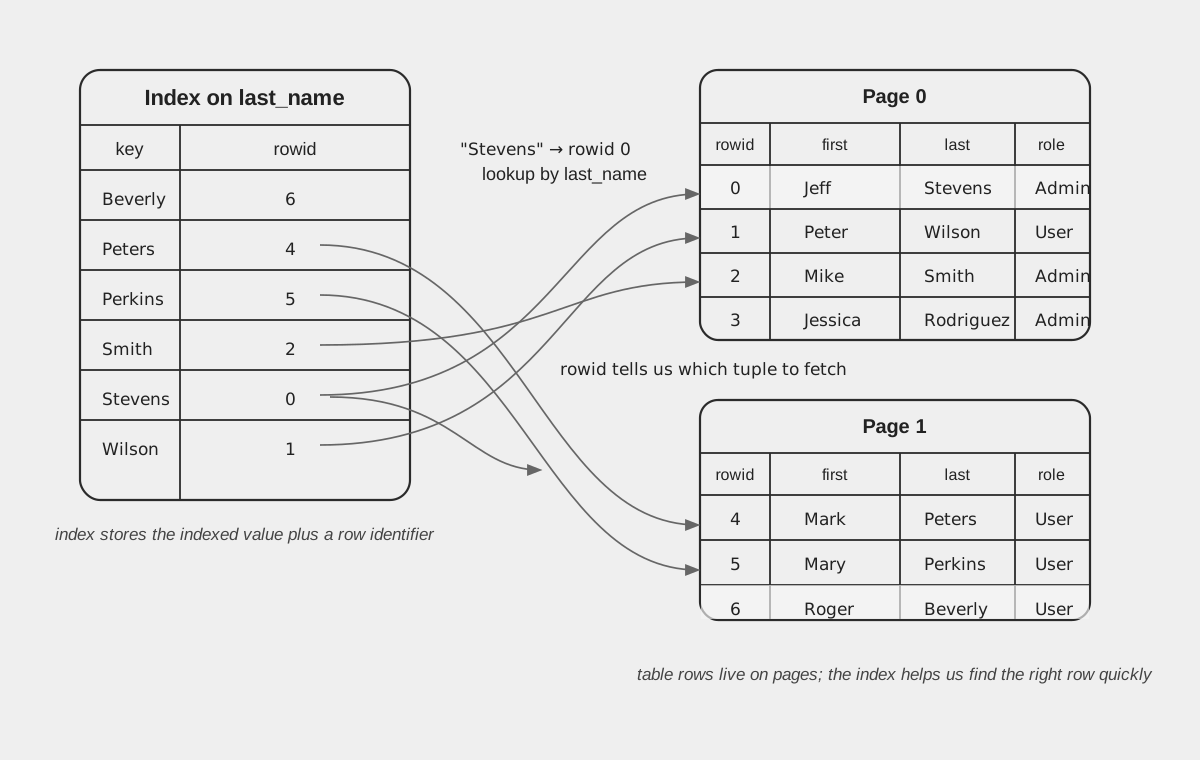
The Index Seek then becomes our access method for our users table on this query.
*NOTE: Above, in our explanation of Selectivity, we said this:
In general:
High selectivity = few rows = good for index lookups
Low selectivity = many rows = scan might be faster*
How/why could a scan be faster?
Think about it for a minute and see if you can guess...
The reason is because every time you find a matching row while searching your index, you now have to grab the RowID and then do an additional Seek into the underlying table to fetch the actual result column values. This is why not all index lookups are actually faster, if the predicate is determined to have very low selectivity, it often can make more sense to just do a full scan of the table, because you no longer are having to jump around between several B+Trees/data structures to fetch all the needed values.
But let's say we have an index on (a, b) and the query is SELECT a, b FROM t WHERE a > 100;... Now our index contains both the values we need to satisfy the query. This is what's known as a Covering index, and this is an extremely ideal situation in query planning. No extra Row ID Seek is needed to fetch the underlying row, you simply Seek to the index and return the values while they match.
So what if we have a join in our query?
Example:
SELECT *
FROM users u
JOIN orders o ON u.id = o.user_id
WHERE u.last_name = 'Peters';
Now things get more complicated, because we are no longer just choosing an access method for one table… we also need to decide:
- Which table do we read first?
- What access method do we use for each table?
- In what order do we perform the joins?
This is called selecting the join order and the access methods, and this is one of the primary and most difficult jobs of the query planner / optimizer.
We could execute this query in several different ways.
One possible plan:
1. Scan users
2. For each user, lookup matching rows in orders
Another possible plan:
1. Use index on users.last_name to find 'Peters'
2. For each matching user, lookup orders by user_id
Another possible plan:
1. Scan orders
2. For each order, lookup user by primary key (RowID)
All of these are logically correct, but some of them might be 1000x slower than others depending on how much data is in each table and what indexes exist.
This is why the optimizer must estimate things like:
- How many rows are in each table
- How selective a predicate is
- Whether an index can be used
- How expensive each join order would be
Even for a simple query with 3 tables, there may already be dozens of possible join orders. Choosing the correct one is one of the hardest parts of building a database system, Inthe general case, optimal join ordering is known to be NP-hard, which is why real databases rely on a mixture of heuristics and cost estimation.
- Execution: now that we have chosen a query plan, we actually need to run it.
The query planner does not directly run the query... Instead, it produces some kind of internal representation of the plan, which is made up of operators.
You can think of operators as small building blocks that each do one simple thing, for example:
- Scan operator -> reads rows from a table
- Index seek operator -> looks up rows using an index
- Filter operator -> applies the WHERE predicate
- Join operator -> combines rows from two tables
- Sort operator -> orders rows
- Aggregate operator -> computes things like COUNT / SUM / GROUP BY
A query plan is basically a tree of these operators.
For example, a simple query like:
SELECT * FROM users WHERE last_name = 'Peters';
might turn into a plan like:
Filter(last_name = 'Peters')
    IndexSeek(users_last_name_idx)
Or for a join:
Join(users.id = orders.user_id)
    IndexSeek(users_last_name_idx)
    Scan(orders)
Each operator produces rows, and passes them to the operator above it.
This means execution usually happens row-by-row, not all at once.
The scan reads a row →
the filter checks it →
the join combines it →
the result is returned.
Some databases compile either the AST directly, or the query plan into bytecode, which is stepped through by a virtual machine (SQLite and tursodb). Many execute the plan using an iterator-style execution engine (like Postgres), and some might even generate native code (I believe some OLAP engines do this).
But the idea is generally the same: The planner decides what to do and the execution engine actually does it.
At some point during execution, the database actually needs to read and write data on disk, and this is handled by the storage engine. Most relational databases store tables and indexes using B-Trees (usually B+Trees, but it varies), which organize rows into fixed-size blocks called pages (often 4KB–16KB each). The database never reads a single row directly from disk, it always reads at least one entire page at a time.
A component, often called the Pager or Buffer Pool manager (names vary by database), is responsible for loading these pages from disk, writing them back when they change, and then keeping track of which pages are currently in memory. Since disk access is extremely slow compared to RAM, the database system keeps a page cache, which stores these recently used pages in memory. A huge part of database performance is just managing this cache correctly: deciding which pages to keep, which to evict, and when they need to be flushed back to disk.
How rows are actually stored on disk
Earlier we mentioned that tables and indexes are stored using B-Trees, and that the database reads and writes fixed-size pages instead of individual rows. Let's go a little deeper into what that actually means.
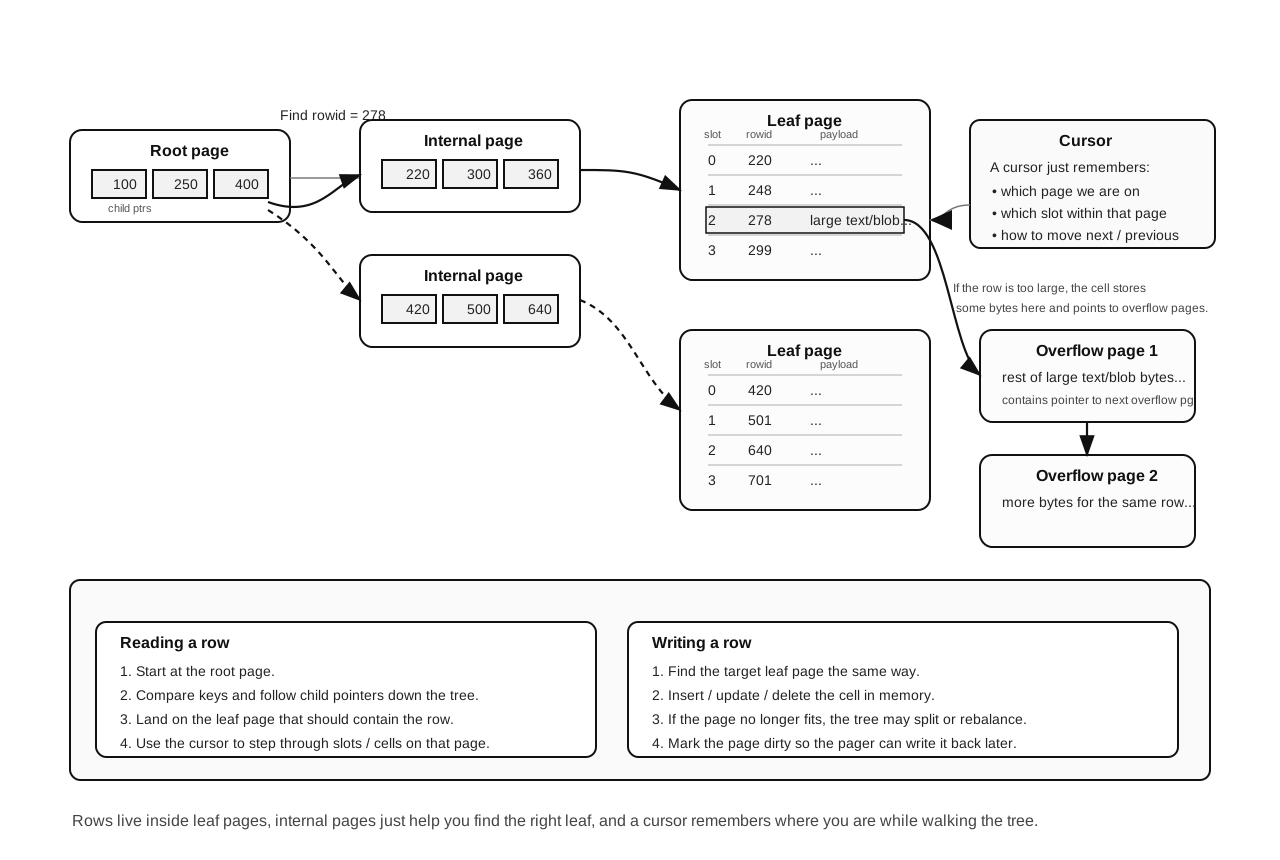
Each table is usually stored as a B+Tree, where each node of the tree is one page on disk. The pages at the bottom of the tree (called leaf pages) contain the actual rows, while the pages above them contain keys that help the database find the correct leaf page quickly. In fact if we SELECT some metadata about tables in SQLite: we can see that for each table in the Catalog, we store the "root page" of the table: 
Inside a page, rows are not just stored one after another in an array type of situation... The page has a small header and a list of pointers (often called slots or cell pointers), and then the actual row data somewhere else in the page. This makes it possible to insert and delete rows without having to rewrite the entire page every time.
When the database wants to read rows from a table, it uses something usually called a cursor. A cursor is basically an object that remembers where we currently are in a given B-Tree. It knows which page we are on, which slot inside the page we are looking at, and how to move to the next or previous row.
To find a specific row, the database starts at the root of the B-Tree, compares keys, follows pointers down through the internal pages, and eventually reaches the correct leaf page. Once it is on the leaf page, the cursor can move from row to row without having to search the tree again.
Indexes work the same way (at least B+Tree indexes do... There are other forms of indexes, primarily hash table indexes but we will leave that out for now), except as we stated earlier, instead of storing the full row they usually store the indexed value alongside a reference to the row in the table (often the RowID or primary key).
Sometimes a row is too large to fit entirely inside one page. In that case, the database stores part of the row on the page and the rest in one or more overflow pages. The main page contains a pointer to the overflow pages, and the storage engine follows those pointers to read the full value. This is commonly used for large text or blob values.
Writing rows works by finding the correct leaf page using the B-Tree, modifying the page in memory, and then marking it 'dirty' in the page cache. The pager later can write the updated page back to disk (usually through the WAL first, if the database is using one).
All of this might sound complicated (and I assure you, it is..), but at least the important idea is fairly simple:
Rows live on pages, the pages live in B-Trees and we use cursors to walk the tree to find the rows... So above, (in the simplest possible terms) when we say that we need to fetch rows from the underlying table, what we mean is we create a new BTree Cursor, and our pager will know from the root page, which page (and the page can just be an offset into a database file) to fetch from the pager, and then we follow pointers from there to possibly fetch other pages and then eventually read the tuples on those pages.
===============================
I hope this is helpful to someone out there, I tried to compile a list of things I wish I would have known at the very beginning of my journey. Maybe I will do a part 2 at some point. If you have any suggestions for improvements or comments, feel free to reach out on X or by email